ShippingBo - Odoo connector: finally align your logistics and finance
Automatically synchronize your inventory, receipts, and invoices between ShippingBo and Odoo.
Do you use ShippingBo to manage your logistics operations and Odoo to handle purchasing, product catalog management, and invoicing?
The connector between ShippingBo and Odoo simplifies and automates the management of logistical and commercial flows by seamlessly integrating both systems. This integration ensures smooth synchronization of essential data, providing better visibility and optimized management of inventory, products, and invoicing.
Why connect ShippingBo to Odoo?
Today, most teams juggle multiple tools: ERP, WMS, e-commerce, marketplaces… and the same information is often entered several times.
The ShippingBo–Odoo connector addresses three key challenges:
Reduce data-entry errors
Fewer copy-paste operations, fewer spreadsheets, less manual input… and therefore fewer mistakes in stock levels and invoices.
Save time every day
Information flows automatically between your logistics, purchasing, and finance teams. Everyone works within their own tool, but with shared, up-to-date data.
Make better decisions
With reliable inventory and synchronized data, you can confidently manage procurement, margins, and logistics capacity.
What the connector actually does
Automate receiving and warehouse preparation
- The expected receipts (supplier orders, expected quantities, etc.) are automatically sent from Odoo to ShippingBo.
- Your warehouse teams have a clear view of what needs to be received and prepared.
- No more re-entering or exporting lists: everything is already in the WMS.
▶ Benefit: your logistics teams can focus on operations, not administration.
Update stock levels in real time
- With every validated receipt or stock movement in ShippingBo, stock levels are updated in Odoo.
- You have an accurate picture of your stock in the ERP: by product, by warehouse, by channel.
▶ Benefit: you avoid stockouts, overstocking, and unpleasant surprises at the end of the month.
Secure supplier invoicing
- The quantities actually received in the warehouse are automatically pushed back into Odoo.
- Invoicing is based on real data, not on a theoretical order.
- Discrepancies are identified more quickly, disputes decrease, and controls become easier.
▶ Benefit: your finance teams save time and improve the reliability of their closing processes.
Centralize product catalog management
- Odoo remains your product master data source: creation and maintenance of the catalog.
- The connector exports the catalog (and the necessary information) to ShippingBo.
- No more duplicate SKUs or inconsistent product sheets from one tool to another.
▶ Benefit: a single, coherent catalog shared across finance, logistics, and sales.
Who Is this connector for?
The ShippingBo–Odoo connector is particularly suited for:
- E-commerce businesses with one or multiple warehouses.
- Retailers combining physical stores, e-shops, and marketplaces
- 3PL/fulfillment providers managing stock for multiple brands
- Any company using ShippingBo as its WMS and looking to industrialize flows with Odoo


Benefits for your teams

For logistics teams
- Clear visibility of expected receipts and available stock
- Less paperwork, fewer manually assembled files
- Better coordination with purchasing and customer service

For finance / accounting teams
- Easier supplier invoice control thanks to alignment between ordered, received, and invoiced quantities
- Fewer disputes and end-of-period adjustments
- More reliable data for margin and performance analysis

For management & operations
- Decisions based on accurate, up-to-date data: inventory, goods flows, profitability
- Smoother collaboration across departments
- Improved customer experience: fewer stockouts, more reliable delivery times
Use Case
Context :
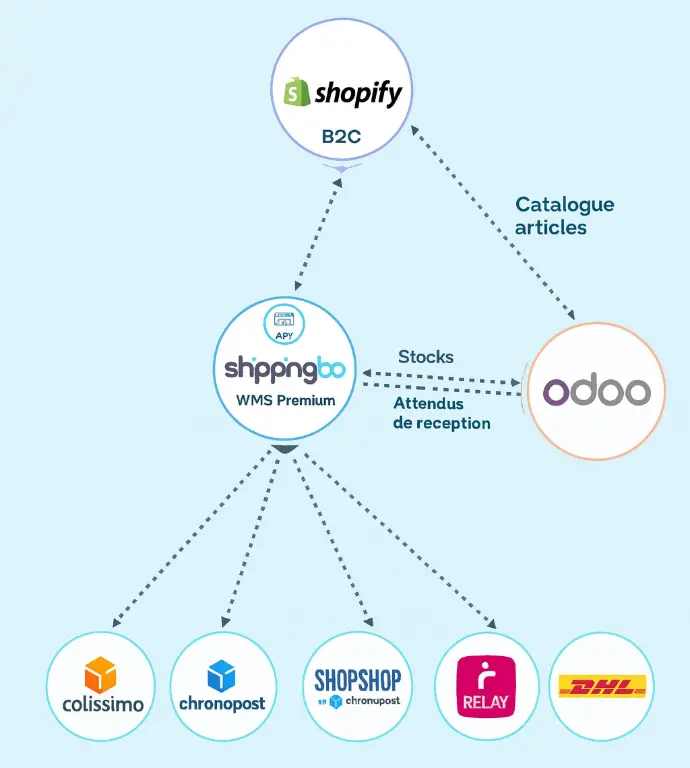
- ShippingBo is used as the WMS to manage inventory and order preparation.
- Odoo is used for the product master file, purchase orders, and invoicing.
With the connector
- The product catalog is maintained in Odoo and synchronized to ShippingBo.
- Expected receipts (purchase orders) are sent to ShippingBo to prepare incoming goods.
- After validation in the warehouse, actual stock levels and received quantities are pushed back to Odoo.
Result
- A single source of truth for products, stock, and invoiced quantities
- Aligned teams across logistics, purchasing, and finance
- A smoother, more controlled e-commerce operation
Frequently Asked Questions: Odoo x ShippingBo Connector
The main advantage of this integration is the immediate gain in logistical fluidity and operational visibility it delivers. By automatically synchronizing critical data, the connector creates a unified ecosystem where your business and logistical operations work in perfect synergy.
The key benefits can be summarized in four points:
• Process Automation : The integration eliminates manual tasks, double entries, and the risks of human errors that arise, thus freeing your teams for higher value-added missions.
• Stock Reliability : The real-time update of each stock movement between ShippingBo and Odoo provides you with a comprehensive and accurate view, essential to avoid stockouts, optimize replenishments, and protect your reputation.
• Simplification of Billing : By ensuring that you ship the right products and validate supplier receipts based on physical quantities, the connector secures the entire billing cycle and significantly reduces disputes.
• Data centralization : Odoo becomes the single source of truth for your product catalog. This centralization ensures perfect consistency of information across all your systems, an essential condition for the scalability of your operations.
To ensure data integrity and operational efficiency, the connector assigns a clear "master" role to each system for specific data types. This distribution prevents data conflicts and ensures that each platform excels in its primary function:
Flow | Odoo | ShippingBo | CMS |
Product catalog | x | ||
B2B Orders | x | ||
B2C Orders | x | ||
Deliveries | x | ||
Purchases | x | ||
Supplier receptions | x | ||
Inventory management | x | x |
The journey of a B2C customer order is optimized to separate the sales channel from the logistical execution, while ensuring perfect synchronization of information.
1. The order is initially placed and recorded on the e-commerce site (the CMS, such as Shopify, Prestashop, etc.).
2. It is then automatically transmitted to ShippingBo, which centralizes all orders to be prepared.
3. The logistics team handles the preparation and shipping of the order via the ShippingBo interface.
4. Once the order is shipped, the delivery information and final status are synchronized in Odoo via a webhook, allowing for the consolidation of sales data and accounting tracking.
The B2B flow is initiated directly from the ERP, which centralizes professional commercial management, ensuring total control over the process.
1. The order is created by the sales team directly in the Odoo ERP.
2. This order automatically generates a delivery request that is sent to the ShippingBo system.
3. The logistics team in the warehouse receives the preparation order and manages the shipping of the order.
4. The delivery status is updated in real-time in Odoo, providing complete and centralized tracking that improves visibility for sales teams and customer service.
The integration ensures maximum stock reliability by assigning the management of physical movements to ShippingBo (WMS), which is designed for this. Each goods entry (supplier receipt) and each exit (customer shipment) is recorded in ShippingBo and immediately synchronized with Odoo.
Thanks to this continuous flow, Odoo maintains a global, consolidated, and always up-to-date view of the available stock. This level of accuracy is fundamental for making informed business decisions: it allows for reliable sales forecasting, optimizes cash flow by avoiding overstocking, and protects your brand's reputation by eliminating sales of out-of-stock products.
The integration ensures both the verification of supplier invoices and customer billing based on the physical reality of the warehouse.
1. On the supplier side : When receiving goods, the logistics team records the physically counted quantities in ShippingBo. This information is instantly transmitted to Odoo. Your accounting department can thus reconcile the supplier invoice with what has actually been received, and not just what was ordered. This process eliminates overpayments and simplifies the resolution of supplier disputes.
2. On the customer side : The reliability of stock data and the rigor of the preparation process in ShippingBo ensure that the right products are shipped. Consequently, the invoice generated in Odoo precisely matches the delivery, drastically reducing claims, credits, and payment delays related to billing errors.
This connector is aimed at e-commerce merchants and omnichannel businesses (B2C, B2B, retail) looking to structure, automate, and professionalize their supply chain to support their growth. It is designed for companies that recognize that logistical excellence is a major competitive advantage.